Shotty

Shotty
License:
Free
Language:
English
Developer:
OS:
Win2000/XP/Vista/7
Updated:
See detailed info

Softonic review

Elena Santos

“Capture and share images online in two clicks”

by Elena Santos about Shotty

Shotty is the perfect companion for all those of you who share screenshots online: a quick, easy-to-use image capture tool with convenient sharing capabilities.

Once installed on your system, Shotty sits unobtrusively in the system tray. The program icon gives you access to its image capturing functions – with a left click – and also to a context menu with configuration options with a right click.

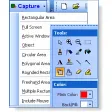
Shotty lets you grab the whole screen, a selected area or the currently active window, and save the captured image to your hard drive. As an extra, Shotty supports transparency effects in Windows 7 and Vista, which is very useful if you plan to save these images as .PNG and edit them later on in Photoshop. If you only need to do some quick editing, such as cropping, adding blurred areas or marking important spots on the image, you can use Shotty’s built-in editor.

But the best feature in Shotty is undoubtedly its ability to share the image online right away, uploading it to one of the photo sharing services supported by the program: ImageShack.us, Twitpic.com, DirectUpload.net and others. Unfortunately the behavior of this feature was a bit erratic, as it didn't seem to work properly unless you enabled the 'Show configuration before upload' option.

With Shotty you can easily capture an image on your desktop and share it online in just a couple of clicks.

Pros
  • Doesn't interrupt work
  • Basic built-in editor
  • Lets you share images online in different hosting services
  • Works with Aero transparency effects
Cons
  • The uploading feature sometimes doesn't work properly

Shotty (1) User reviews

  • rank_0
  • 0/10
  • Thomas Baumann Thomas Bauman
    n
    User reviews
    1

    I'm sad to say the review is incorrect.

    The title says it's a review from the version 1.0, but it is not. It is one from the 1.1 BETA versions (Beta 1 I think, beause the old editor UI is shown on... More

    • Review of Shotty - 12 Oct 2010
      This review is liked by 1 of 1
Your avatar
Review
  1. Maximum: 75 characters

  2. See example

Pros and Cons
Rate
  1. What rating would you give Shotty?

    You need to fill in all fields

    • Usability:

      Not rated
    • Stability:

      Not rated
    • Installation:

      Not rated
    • Functionality:

      Not rated
    • Appearance:

      Not rated
    • Overall rating:

      Not rated
  2. Don't worry, we won't make your email address public.

You're not allowed to share serial numbers, cracks, etc. or link to pages that contain them. If you do, your user account will be deleted, your IP address logged and legal action will be taken.

Get started - just ask a question!

Write a title for your question.

Alternativesto Shotty

  • In English:
    MWSnap
    MWSnap

    Practical tool to take screen snapshots

    Softonic rating:
    • 7/10
    User rating:
    • 8/10
  • Better rating:
    Screenshot Captor
    Screenshot Captor

    Simple and functional screenshot program

    Softonic rating:
    • 9/10
    User rating:
    • 8/10
Compare with Shotty
Download rank: Screen capture software

80 of 104

Softonic rating:
  • Very good
  • 8/10
Your rating:
Your rating
  • 0

Review and rate this program

Top Downloads: Screen capture software

  • United States
  • Global

  1. Simple and functional screenshot program

Older versions of Shotty

Reviews of Shotty in other languages